Promo Type 7: Special Price
- Promo types including:
(1) Discount Percentage
(2) Buy X Get Y
(3) Discount Nominal
(4) Buy X Bonus Y
(5) Coupons
(6) Discount Progressive
(7) Special Price
(8) Discount Fix Product
(9) Discount After Amount
Special Price (E.g. Set certain product at RM9.90)
- Go to Transaction > Promo > Create New
- Select Special Price in promotion type
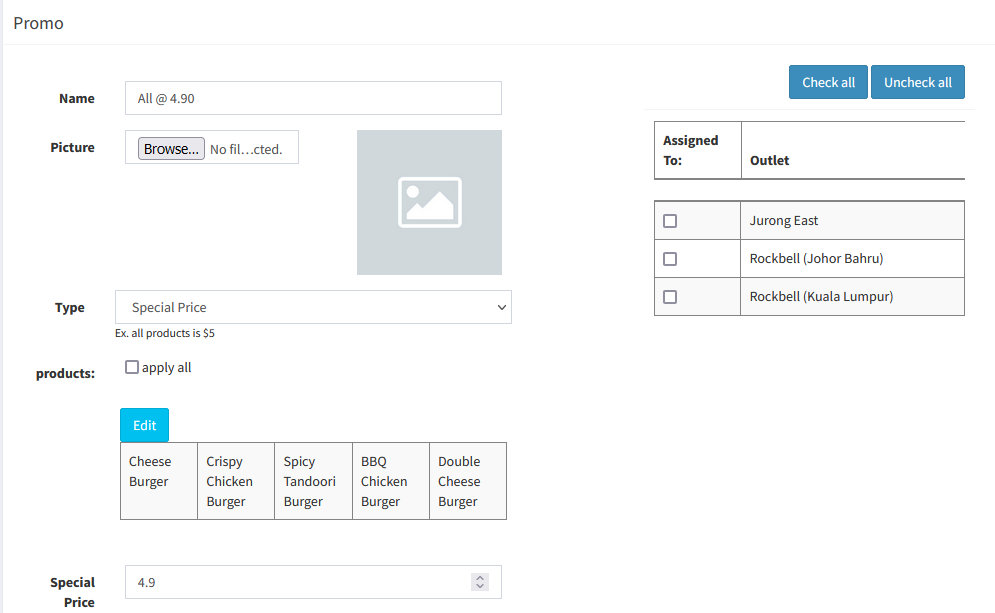
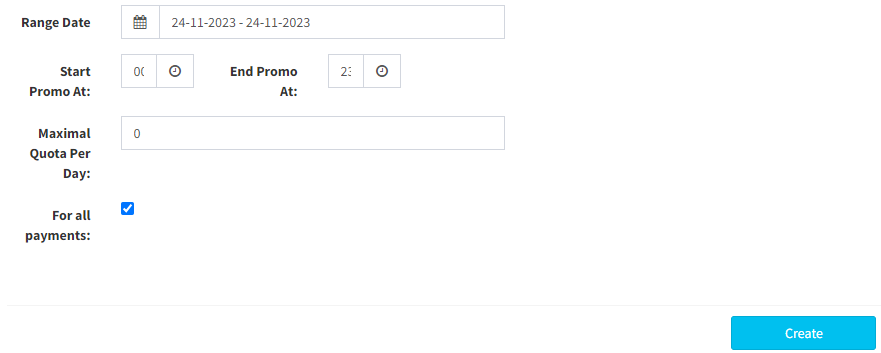
- Fill in information needed, then click on
 to create special price promotion
-------------------------------------------------------------------------------------------------------------
Please refer to video below for more information:
Was this article helpful?
That’s Great!
Thank you for your feedback
Sorry! We couldn't be helpful
Thank you for your feedback
Feedback sent
We appreciate your effort and will try to fix the article